
Yes, Singapore merchants can use Shopify's built-in shipping tools for many everyday tasks, but most stores benefit from adding a courier app or aggregator for local label printing, cross-border customs paperwork, and predictable multi-carrier rates. The right path depends on your order volume and how often you ship internationally.
Your best starting point by merchant profile:
- Micro sellers (under 30 orders/week): Shopify's native shipping settings, manual label generation, and scheduled carrier pickups are often enough. Many small Singapore stores pack at home and book pickups directly, keeping overhead low.
- Mid-size merchants (30+ orders/week, domestic and regional): Add a carrier-specific Shopify app such as the SingPost integration or a regional courier app to automate label printing and tracking sync.
- Merchants with frequent cross-border sales: Use a multi-carrier aggregator like Simplyparcel to compare rates, automate customs documents, and manage multiple couriers from one dashboard.
Next step: Check your average weekly orders and open your Shopify admin's Shipping and Delivery settings to see which carrier accounts and apps are already available to you.
Key Takeaways
Singapore Shopify merchants get the most reliable shipping workflow by combining Shopify's native order management with a purpose-built integration for label printing, customs documentation, and multi-carrier rate comparison.
| Point | Details |
|---|---|
| Native Shopify covers low-volume basics | Merchants under 30 orders/week can manage with Shopify's built-in zones, rates, and manual pickups. |
| Carrier apps fill the label printing gap | Apps like the SingPost integration add label printing and automatic tracking sync for single-courier workflows. |
| Aggregators handle cross-border complexity | Simplyparcel automates customs forms, compares carrier rates, and syncs tracking to Shopify for international orders. |
| PayNow requires a separate gateway | Shopify Payments does not support PayNow natively; add HitPay or a similar gateway to accept it at checkout. |
| Simplyparcel suits scaling Singapore merchants | Simplyparcel offers multi-carrier comparison, free pickup, and automated customs docs for Singapore-origin international shipments. |
Table of Contents
- What does Shopify Shipping actually offer Singapore merchants?
- Which integration route fits your Singapore Shopify store?
- How to configure Shopify shipping settings for Singapore
- What you need to know about international shipping from Singapore
- Day-to-day shipping operations: packing, labels, returns, and tracking
- How Simplyparcel integrates with Shopify for Singapore merchants
- What Singapore Shopify merchants should do next
- The part most Shopify guides for Singapore merchants get wrong
- Ship smarter from Singapore with Simplyparcel
- Sources
What does Shopify Shipping actually offer Singapore merchants?
Shopify's built-in shipping tools give Singapore store owners a solid operational foundation. Inside the Shopify admin, you can create shipping zones, set weight-based or price-based rates, configure package profiles, and enable local delivery or in-store pickup. Order tracking syncs back to each order automatically when a supported carrier is connected, and bulk label printing is available for carriers that have a native Shopify integration.
Where Shopify's native tools fall short for Singapore specifically: the platform does not natively print SingPost or NinjaVan labels in most standard accounts without an additional app. Shopify Payments also does not support PayNow, which is a widely used checkout method in Singapore. Practical reviews for Singapore merchants confirm that stores needing PayNow typically add HitPay or a similar gateway to bridge that gap.
On carrier discounts, Shopify's 2025 shipping guide notes that discounted carrier rates and included features like tracking and insurance apply in select regions. For Singapore merchants, those discounts are not always as deep as they are for US-based stores, so the practical value of Shopify's native carrier pricing varies. If you ship fewer than 30 parcels a week and your customers are mostly local, Shopify alone may cover you. Once you add regular international orders or need automated customs forms, an integration becomes worth the setup time.
Pro Tip: Before installing any app, go to Settings > Shipping and Delivery in your Shopify admin and review which carrier-calculated rate options are already active. This tells you exactly what you have before adding complexity.
Which integration route fits your Singapore Shopify store?
There are three practical paths for connecting your Shopify store to courier services in Singapore. Each suits a different operational profile.
Path A: Native Shopify shipping only This works well for very low-volume stores with simple product lines. You set up shipping zones and flat or weight-based rates in the Shopify admin, pack orders yourself, and book pickups directly with a carrier. The main limits are label printing (not all local carriers are natively supported) and the absence of automated customs forms for international orders. For merchants shipping fewer than 30 orders a week, the manual overhead is manageable.

Path B: Carrier-specific Shopify apps Installing a carrier's own Shopify app unlocks label printing, pickup scheduling, preferred rates, and automatic tracking sync for that carrier. The SingPost Shopify app, for example, provides order syncing, shipment creation, preferred SingPost rates, and automatic tracking updates pushed back to your Shopify orders. This path makes sense when you rely consistently on one courier and want a tight, direct integration without managing multiple platforms.
Path C: Multi-carrier aggregators An aggregator connects your Shopify store to several couriers at once, lets you compare rates at the point of booking, automates customs documentation, and consolidates billing. Simplyparcel operates exactly this way for Singapore merchants. The trade-off is a small per-shipment service fee, but for merchants shipping internationally or using more than one courier, the time saved on paperwork and rate-hunting typically offsets that cost. Courier aggregators are particularly useful when your order mix includes both domestic and cross-border parcels.
Decision checklist before choosing a path:
- Weekly order volume (under 30 = Path A is viable; above = consider B or C)
- Carrier requirements: do you need same-day delivery or cash-on-delivery? Check whether your preferred carrier has a Shopify app.
- Cross-border frequency: shipping internationally more than a few times a week makes automated customs docs worth the setup.
- Checkout payment needs: if PayNow is important to your customers, add HitPay alongside whichever shipping path you choose.
- Accounting visibility: aggregators and carrier apps both push tracking and cost data back to Shopify orders, keeping your records clean.
How to configure Shopify shipping settings for Singapore
Follow this checklist in your Shopify admin to get orders charged correctly and dispatched without errors.
1. Audit your order profile first. Note your average weekly orders, typical parcel weight and dimensions, and the domestic-to-international split. These three numbers determine which path above fits you and what rate rules to set.
2. Configure shipping zones and rates.
- Create a Singapore domestic zone covering all local postcodes.
- Add a Southeast Asia zone and a Rest of World zone for international orders.
- Set weight-based or price-based rate rules within each zone. Weight-based rules are more accurate for physical goods; price-based rules work for stores with uniform product sizes.
- If you have a carrier account connected, enable carrier-calculated rates so customers see live quotes at checkout.
3. Set up package profiles. Go to Settings > Shipping and Delivery > Packages and create presets for your most common box or mailer sizes. Accurate dimensions prevent dimensional weight surprises on your carrier invoices.
4. Enable local delivery or pickup. If you offer same-day local delivery or in-store collection, configure the delivery radius and flat fee (or free threshold) under the Local Delivery section. This is separate from your standard shipping zones.
5. Install and connect your carrier app or aggregator. Search the Shopify App Store for your chosen carrier app (e.g., SingPost) or aggregator. Follow the app's setup flow to link your carrier account credentials. Shopify's developer integration framework handles the API handshake for label generation, fulfillment updates, and tracking sync once credentials are confirmed.
6. Test label purchase and tracking sync. Place a test order, purchase a label through the app, and confirm the tracking number appears on the Shopify order page.
7. Set up bulk fulfillment. Once single-order labels work correctly, test a batch of five to ten orders. Verify that all tracking numbers push back to Shopify and that pickup is scheduled correctly.
Pro Tip: Run a short QA checklist before going live: confirm address validation is on, check that international orders trigger a customs form prompt, and test the return label flow for at least one order. Fixing these in staging costs nothing; fixing them after a customer complaint costs time and trust.
What you need to know about international shipping from Singapore
Shipping across borders from Singapore requires specific documentation for every parcel. Here is what merchants are responsible for:
- Commercial invoice: Required for all international commercial shipments. It must state the item description, quantity, declared value in the transaction currency, and the sender's and recipient's details.
- CN22 or CN23 customs form: Required for postal shipments. CN22 covers parcels under a certain value threshold; CN23 applies to higher-value items. Many courier services handle these electronically, but you need to supply accurate item data.
- HS codes: Harmonized System codes classify your goods for customs. Assigning the correct HS code prevents clearance delays. Use the Singapore Customs HS code search or your aggregator's built-in lookup to find the right code for each product category.
- Duties and taxes (DDU vs. DDP): Under Delivered Duty Unpaid (DDU), the recipient pays import duties on arrival, which can cause delivery refusals. Under Delivered Duty Paid (DDP), you collect duties at checkout and remit them. DDP improves delivery success rates but requires more setup. Display whichever applies clearly at checkout so customers are not surprised.
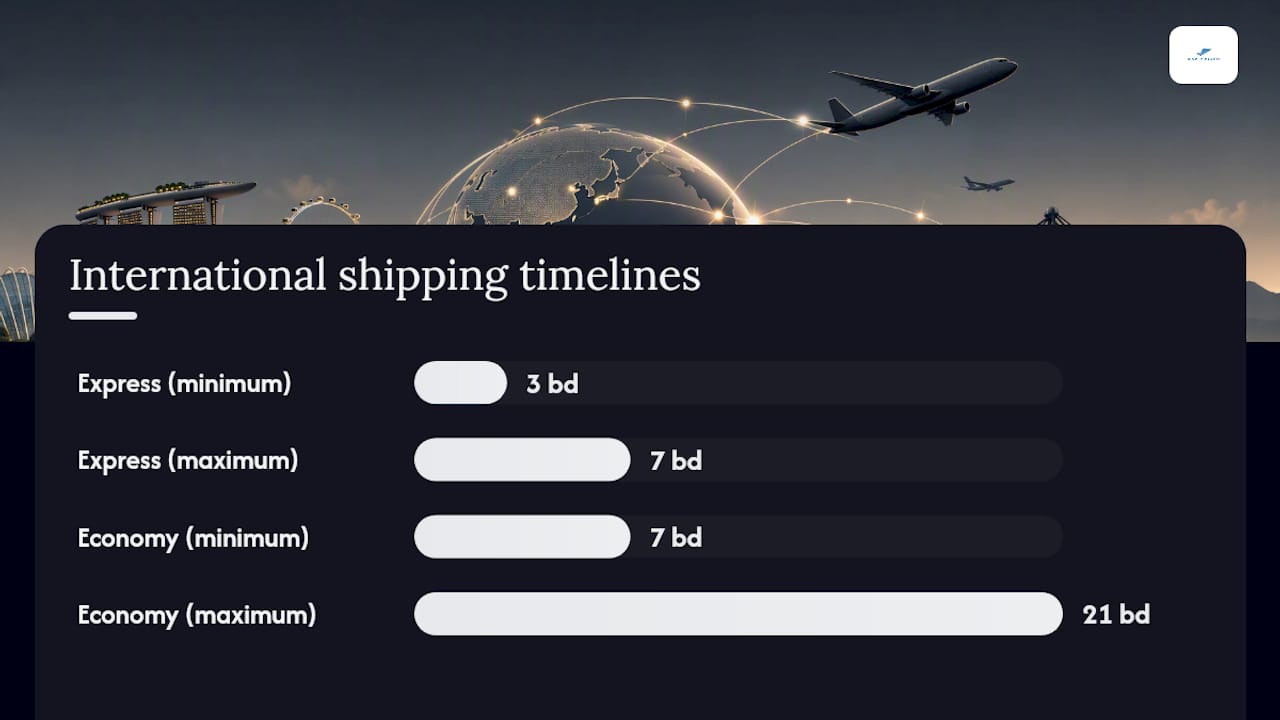
Realistic timelines from Singapore: Express courier services to major markets like Australia, the UK, and the US typically take 3–7 business days. Economy services run 7–21 business days depending on the destination and customs clearance speed. Customs clearance variability is the biggest timeline wildcard, especially for shipments to markets with strict import controls.
Global e-commerce retail sales continue to grow year over year, according to Statista's worldwide retail e-commerce datasets. For Singapore merchants, that sustained growth makes investing in a reliable international shipping workflow one of the highest-return operational decisions you can make.
For a deeper look at the common obstacles merchants encounter when shipping across borders, the international shipping challenges guide covers practical mitigation strategies specific to Singapore-origin parcels.
Day-to-day shipping operations: packing, labels, returns, and tracking
Packaging and dimensional weight. Carriers calculate fees using either actual weight or dimensional weight (length × width × height ÷ a divisor), whichever is higher. Use the smallest box that protects your product. Oversized packaging is one of the most common sources of unexpected shipping costs for Singapore SMEs. Label every parcel clearly with the recipient's full address, your return address, and any carrier-required barcodes.
Labeling workflow. Generate labels from whichever platform you use: Shopify admin for natively supported carriers, your carrier app for single-carrier workflows, or your aggregator dashboard for multi-carrier orders. The critical step is confirming the tracking number syncs back to the Shopify order. When it does, Shopify automatically sends the customer a shipping notification, which reduces "where is my order?" messages.
Returns and exchanges. Set a clear returns policy in your Shopify store and configure return labels under Settings > Shipping and Delivery. For local returns, some courier services offer collection points or scheduled pickup returns. For international returns, the cost is usually borne by the merchant or shared with the customer, so state this clearly in your policy before a dispute arises.
Tracking and customer communication. Automated shipping notifications from Shopify cover the basics. For higher-value orders, consider adding a branded tracking page so customers can check status without contacting you. Clear delivery timelines on product pages and at checkout also reduce post-purchase anxiety.
Pro Tip: When your volume grows past 20–30 orders a week, batch your pickups. Schedule one or two fixed pickup windows per day rather than booking ad hoc. This reduces per-parcel handling time and often qualifies you for free pickup arrangements with your courier.
How Simplyparcel integrates with Shopify for Singapore merchants
Simplyparcel works as a multi-carrier aggregator built specifically for Singapore-origin shipments. The workflow from Shopify order to dispatched parcel looks like this:
- An order is placed in your Shopify store.
- You log in to Simplyparcel, enter or import the shipment details, and compare live rates across multiple courier partners.
- You book and pay online, and Simplyparcel generates the shipping label and any required customs documentation automatically.
- A pickup is scheduled with your chosen courier.
- The tracking number is returned to your Shopify order, triggering the customer notification.
Features that matter for Shopify merchants:
- Multi-carrier rate comparison at the point of booking, so you always see the most cost-effective option for that parcel's weight, dimensions, and destination
- Automatic generation of customs forms and shipping labels, removing the manual paperwork step for international orders
- Bulk label printing for merchants processing multiple orders at once
- Real-time tracking sync so order status stays current in your Shopify admin
- Pickup booking included, with free pickup available on qualifying shipments
When Simplyparcel is the right choice:
- You ship internationally more than a few times a week and need automated customs documentation
- You use more than one courier and want a single platform for rate comparison and billing
- You are a subscription box seller or SME scaling cross-border sales and need consistent, predictable pricing
- You want transparent shipping rates without negotiating separate contracts with each carrier
For merchants who currently handle everything manually, Simplyparcel reduces the number of steps between a confirmed Shopify order and a dispatched parcel, which directly lowers the time cost per shipment as volume grows.
What Singapore Shopify merchants should do next
For Singapore merchants, the most practical approach to Shopify shipping is to start with what Shopify's native tools give you, then add integrations where the gaps actually cost you time or money.
| Point | Details |
|---|---|
| Start with native Shopify settings | Configure zones, weight-based rates, and package presets in your Shopify admin before adding any app. |
| Add a carrier app for single-courier needs | Install the SingPost app or a similar carrier integration for label printing and automatic tracking sync. |
| Use an aggregator for international orders | Simplyparcel compares rates across couriers, automates customs forms, and syncs tracking back to Shopify. |
| Test before going live | Run a staging order, confirm label printing works, and verify tracking numbers appear on Shopify orders. |
| Keep shipping costs visible in orders | Reconcile carrier invoices monthly and confirm shipping costs are recorded on each Shopify order for clean accounting. |
The part most Shopify guides for Singapore merchants get wrong
Most guides on Shopify shipping for Singapore spend the bulk of their space on Shopify's US-centric features, then add a short paragraph noting that "some features may not be available in your region." That framing is backwards. For Singapore merchants, the integration layer is not optional extra credit. It is the actual product.
Shopify gives you an excellent admin, clean order management, and a reliable checkout. What it does not give Singapore merchants out of the box is native SingPost label printing, PayNow at checkout, or automated customs forms for cross-border parcels. Those gaps are not minor inconveniences. They are the operational core of running a Singapore-based e-commerce store.
The conventional advice to "just use Shopify Shipping" is sound for a merchant in the US or UK, where Shopify's carrier partnerships are deep. For a Singapore store shipping to Malaysia, Australia, or the US, that advice leaves you doing customs paperwork manually, printing labels outside Shopify, and reconciling tracking numbers by hand. The smarter move is to treat Shopify as your order management system and connect it to a purpose-built shipping layer from day one.
The merchants who scale most efficiently in Singapore are not the ones who find the cheapest single carrier. They are the ones who build a workflow where every order flows from Shopify to a label to a tracking update without manual intervention. That is what an aggregator like Simplyparcel is designed to do, and it is the setup worth prioritizing before volume forces your hand.
Ship smarter from Singapore with Simplyparcel
Simplyparcel is built for Singapore merchants who need more than Shopify's native tools provide. Where Shopify manages your orders, Simplyparcel handles the shipping layer: multi-carrier rate comparison, automatic customs documentation, bulk label generation, and real-time tracking sync back to your Shopify admin. There are no long-term contracts and no carrier negotiations. You book each shipment online, compare live rates across courier partners, and schedule a free pickup, all from one platform.
Whether you are a growing SME shipping to regional markets or a cross-border seller dispatching to the US, UK, or Australia, Simplyparcel gives you predictable pricing and a clear paper trail on every order. Get an instant shipment quote and see the rates available for your next parcel before committing to anything.
Sources
- Ship on Shopify for unified fulfillment
- Shopify Review for Singapore Sellers (2026) | StoreStarter
- SingPost‑Shipping & Fulfilment - Seamless SingPost Integration for Quick Shipments | Shopify App Store
- Statista
- Shopify