
The parcel tracking process is the method by which a shipment generates status updates through barcode scans at specific handling points, allowing senders and recipients to monitor its journey from origin to delivery. Each scan creates a digital record tied to your unique tracking number, giving you visibility into where your package is and what stage it has reached. For both individuals sending personal gifts and businesses managing high-volume exports, understanding how this system works removes guesswork and helps you respond quickly when something goes wrong. Carriers like FedEx, DHL, UPS, and Singapore Post all operate on this same scan-based model, and knowing the logic behind it puts you in control.
What are the key components needed to track a parcel?
The tracking number is the foundation of the entire parcel tracking process. It is a unique alphanumeric identifier, typically 12 to 22 characters, encoded in the barcode printed on your shipping label. Every scan that barcode receives at a handling facility gets logged against that number in the carrier's database, which is what you see when you check your shipment status online.
Before you can track a parcel, you need to identify the correct carrier. Entering a FedEx tracking number into the DHL portal returns nothing useful. Most shipping confirmation emails name the carrier directly, but if yours does not, universal tracking platforms like 17TRACK, AfterShip, and Parcel Monitor can detect the carrier automatically and pull updates from multiple systems in one place.

Here is a comparison of the main tracking tools available to you:
| Tool | Best for | Key feature |
|---|---|---|
| Carrier website (FedEx, DHL, UPS) | Single-carrier shipments | Most accurate, real-time scan data |
| 17TRACK | Multi-carrier or international | Supports 2,400+ carriers globally |
| AfterShip | eCommerce businesses | Branded tracking pages and analytics |
| Parcel Monitor | Consumers tracking multiple orders | Clean dashboard, push notifications |
| Simplyparcel tracking portal | Singapore-based international shipments | Integrated with courier partners |
Beyond the tracking number and the right portal, you should activate push notifications or SMS/email alerts wherever the platform allows. Waiting to manually check status is inefficient. Automated parcel tracking alerts push each new scan event directly to your phone or inbox, so you know the moment your package clears customs or goes out for delivery.
Pro Tip: If you ship frequently, use AfterShip or 17TRACK to consolidate all your tracking numbers in one dashboard. Checking five carrier websites separately wastes time and increases the chance of missing a critical status update.
What are the typical steps of the parcel tracking process?
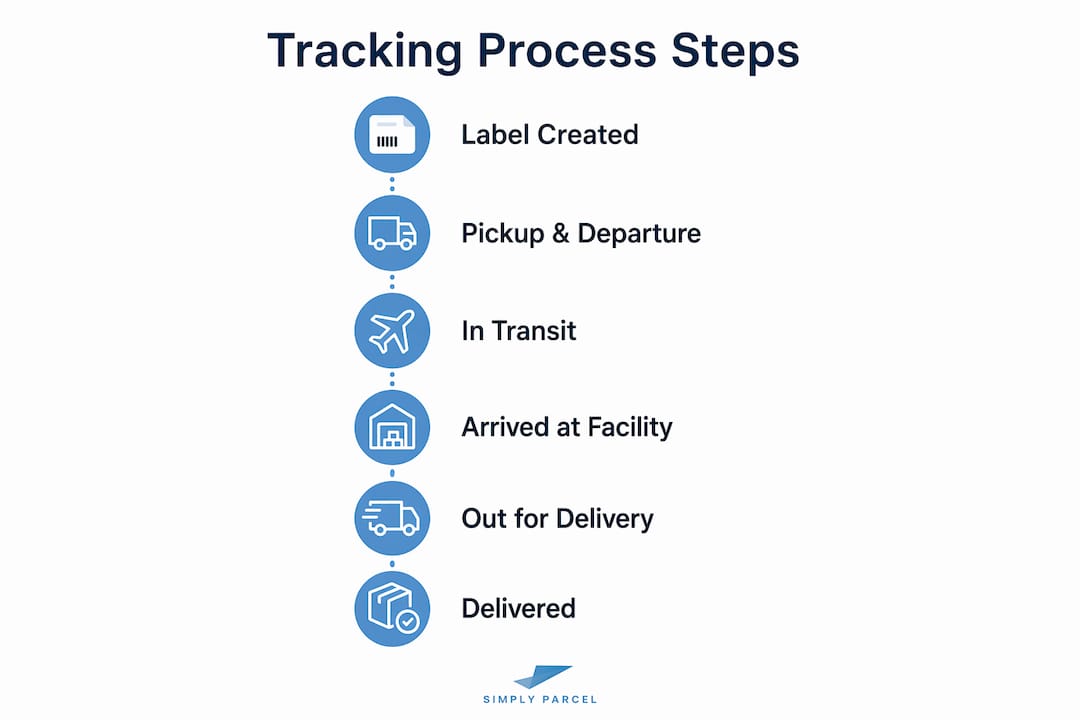
Parcel tracking follows a predictable event sequence that mirrors the physical journey of your package. Each stage produces a specific scan event, and understanding what each one means helps you interpret your tracking history accurately.
Here are the standard stages in order:
-
Label created. The sender generates a shipping label and the carrier's system receives the electronic data. The package has not yet been physically handed to the carrier. USPS, for example, shows a pre-shipment status at this point, which can mislead recipients into thinking the carrier already has the parcel when it often does not.
-
Acceptance or pickup scan. The carrier physically receives the package at a drop-off point or during a scheduled pickup. This scan confirms the carrier has possession and officially starts the tracked journey.
-
Arrival at origin facility. The parcel reaches the first sorting hub, where it is scanned, sorted by destination, and loaded onto the appropriate transport route.
-
In transit between facilities. The package moves between regional depots or distribution centers. Tracking updates rely on scan events at checkpoints rather than live location tracking, so you may see no new updates for hours or even days during this phase.
-
Arrived at destination facility. The parcel reaches the sorting hub closest to the delivery address. This scan is a strong signal that delivery is approaching.
-
Out for delivery. A local courier has loaded the package onto a delivery vehicle. This is the last scan before the final delivery attempt.
-
Delivered. The final scan confirms the package was handed to the recipient or left at the designated location, along with a timestamp and sometimes a GPS coordinate or photo.
The table below shows what each status typically means for your expected timeline:
| Tracking status | What it means | Typical time to next update |
|---|---|---|
| Label created | Shipment data submitted, not yet picked up | Hours to 1 day |
| Accepted / picked up | Carrier has physical possession | 4 to 12 hours |
| In transit | Moving between facilities | 1 to 3 days domestic |
| Arrived at facility | At sorting hub near destination | 12 to 24 hours |
| Out for delivery | On the delivery vehicle | Same day |
| Delivered | Package received | Final update |
How do you interpret tracking updates and status gaps?
Reading a tracking history correctly is a skill that saves you unnecessary worry and helps you act at the right time. The most common mistake is treating every pause in updates as a problem. Tracking gaps of 24 to 48 hours domestically and 2 to 5 days internationally are common because carriers do not scan parcels at every single handoff point.
Here is what the most common statuses actually mean:
- Label created: Shipment data exists in the system. The carrier does not have your parcel yet.
- In transit: A broad status confirming movement through the network. It does not indicate a problem.
- Arrived at facility: Your parcel is at a specific hub. This is a positive, confirmable location event.
- Exception or held: These statuses require attention. They indicate a delay, failed delivery attempt, or address issue.
- Customs clearance: Your parcel is being processed by customs authorities. This is normal for international shipments.
- Delivered: Confirmed receipt. If you did not receive it, check with neighbors or building management before contacting the carrier.
The best predictor for delivery timing is not the "in transit" status. Recent scan timestamps and last-mile delivery status are far more reliable indicators of when your package will arrive. If your parcel shows "arrived at destination facility" with a timestamp from this morning, same-day or next-day delivery is likely.
Tracking systems batch upload scan events rather than pushing them in real time, which means a parcel can travel for several hours without any new update appearing in your portal. This is normal operations, not a lost package.
Wait at least 48 hours after the last domestic scan update, or 5 business days for international shipments, before contacting carrier support. Acting too early rarely produces useful information and consumes your time.
Pro Tip: Screenshot your full scan history before calling carrier support. Providing precise timestamps and event details gets your issue resolved faster than a vague description of the problem.
How does international parcel tracking differ?
International shipments go through a more complex version of the same process, with additional scan events and potential gaps that domestic tracking does not have. Understanding these differences helps you set accurate expectations and avoid unnecessary concern.
International shipments require customs clearance scans and often involve handoffs between multiple carriers, which can cause tracking visibility to shift or temporarily disappear. A parcel shipped from Singapore to Germany via DHL may transfer to Deutsche Post for last-mile delivery, and the DHL tracking page may stop updating once that handoff occurs.
Key differences to know for international shipments:
- Customs clearance events appear as distinct scan statuses and can add 1 to 5 business days to transit time depending on the destination country and declared goods.
- Carrier handoffs at borders mean your original tracking number may only work on the origin carrier's portal up to a certain point. The destination carrier may issue a new tracking number.
- Tracking visibility gaps of 2 to 5 days are normal during ocean or air freight legs where no scanning infrastructure exists.
- Duties and taxes holds generate a specific status requiring your action before the parcel can be released.
International shipments often require monitoring multiple carriers' systems and local postal services due to tracking number handoffs at borders. Universal platforms like 17TRACK handle this automatically by detecting carrier transitions and pulling data from both origin and destination systems.
Follow these steps to manage international tracking effectively:
- Save both the origin carrier tracking number and any secondary tracking number issued by the destination carrier.
- Use a universal tracking platform alongside the origin carrier's portal.
- Check the destination country's customs authority website if your parcel shows a prolonged customs hold.
- Confirm that your commercial invoice and declared value are accurate before shipping to avoid customs delays.
- For guidance specific to Singapore-based senders, the international tracking from Singapore resource covers carrier-specific handoff patterns in detail.
Pro Tip: Always declare the accurate value and description of your goods on customs documentation. Incorrect declarations are the single most common cause of customs holds and can result in fines or parcel seizure.
Key takeaways
The parcel tracking process works through scan-based checkpoint events, not continuous location monitoring, and reading those events correctly is what separates informed shippers from anxious ones.
| Point | Details |
|---|---|
| Tracking is scan-based | Updates appear only when a barcode is scanned at a handling point, not during transit. |
| Gaps are normal | Domestic silences of 24 to 48 hours and international gaps of 2 to 5 days are standard. |
| Last-mile status predicts delivery | "Arrived at destination facility" and "out for delivery" are the most reliable ETA signals. |
| International adds complexity | Customs scans, carrier handoffs, and multi-system tracking are standard for cross-border shipments. |
| Prepare before contacting support | Tracking number, timestamps, and full scan history speed up carrier investigations significantly. |
What tracking experience has taught us at Simplyparcel
The most common frustration we see from both individual senders and business shippers is not a lost parcel. It is a misread status. People see "in transit" with no update for two days and assume something has gone wrong, when in reality the parcel is sitting in a depot waiting for the next scheduled truck. Treating tracking updates as checkpoint logs, not real-time locations, changes how you experience the entire shipping process.
There is also a widespread misconception that "label created" means the carrier has your parcel. It does not. We have seen business clients raise investigations with carriers only to discover the parcel was still sitting at their own warehouse waiting for pickup. The acceptance scan is the only status that confirms physical possession.
For businesses shipping regularly, the single most underused practice is organizing tracking data before contacting support. Carriers resolve issues faster when you arrive with a tracking number, a precise timeline, and the specific scan events in question. Vague complaints about a "missing package" without event history slow everything down.
The advantages of parcel tracking go well beyond knowing where your package is. When you understand the process, you can predict delivery windows, catch customs issues early, and build more accurate shipping timelines for your customers. That is the real value of learning this system properly.
— Simply
Ship and track with Simplyparcel
Simplyparcel gives Singapore-based senders a single platform to compare courier rates, book pickups, and monitor shipments from label creation to final delivery. Whether you are sending a personal parcel or managing regular business exports, the platform integrates with major courier partners so your tracking updates appear in one place without switching between carrier portals. Get an instant shipment quote to compare rates across priority, connect-plus, and economy shipping speeds. For cross-border shipments, explore international shipping options that include customs documentation support and real-time parcel delivery updates throughout the journey.
FAQ
What is a tracking number and where do I find it?
A tracking number is a unique alphanumeric code assigned to your shipment at the time the label is created. You will find it in your shipping confirmation email, on your physical receipt, or in your seller's order management portal.
Why has my tracking not updated for two days?
Tracking gaps of 24 to 48 hours domestically are normal and usually mean your parcel is in transit between facilities where no scan was performed. Wait at least 48 hours before contacting the carrier.
What does "in transit" mean on my tracking page?
"In transit" confirms movement through the carrier's network but does not indicate a problem or a specific location. It is a broad status that covers all movement between acceptance and arrival at the destination facility.
How do I track a parcel that has crossed into another country?
Use a universal tracking platform like 17TRACK, which automatically detects carrier handoffs and pulls data from both origin and destination carrier systems. You may also receive a secondary tracking number from the destination carrier once the parcel clears customs.
When should I contact the carrier about a missing parcel?
Contact the carrier after 48 hours of no updates for domestic shipments, or after 5 business days for international ones. Have your tracking number, the last scan timestamp, and the full event history ready before you call.