
Knowing where your parcel is at any given moment matters more than most people realize until something goes wrong. If you send packages overseas regularly, whether as a small business owner or an individual, learning how to track international shipments is not optional. It is the difference between catching a customs delay early and finding out a week later that your customer's order never arrived. This guide walks you through everything: the tools you need, the exact steps to follow, how to troubleshoot gaps in tracking data, and what to do after delivery to protect yourself and your customers.
Table of Contents
- What you need before you start: tracking basics and tools
- Step-by-step instructions for tracking your international shipment
- Common challenges and how to troubleshoot them
- How technology is improving tracking visibility for Singapore shippers
- Verifying delivery and managing post-delivery tracking issues
- Why the conventional wisdom on international shipment tracking is backwards for Singapore SMEs
- Simplify your international shipment tracking with Simply Parcel
- Frequently asked questions
Key Takeaways
| Point | Details |
|---|---|
| Use multi-carrier tools | Consolidated tracking platforms simplify monitoring shipments across 1,000+ carriers effectively. |
| Track key milestones | Set alerts for major shipment events instead of constant refreshing to save time. |
| Know Singapore Post limits | Registered mail tracks only up to dispatch with limited overseas updates and slow enquiry responses. |
| Leverage new tech | RFID and sensing tech improve accuracy and reduce shipment errors significantly. |
| Prepare documentation | Keep shipment receipts and tracking history organized to resolve delivery issues quickly. |
What you need before you start: tracking basics and tools
Before you can track global shipments confidently, you need two things: your tracking number and the right platform to read it. Sounds simple, but many Singapore shippers skip preparation and end up checking five different websites for the same parcel.
Understanding tracking numbers
Every carrier uses a different tracking number format. FedEx typically uses 12 or 15-digit numbers. DHL uses 10-digit codes. UPS uses an 18-character alphanumeric format starting with "1Z." Singapore Post (SingPost) uses formats like RR123456789SG for registered mail. Knowing your carrier's format helps you avoid entering numbers into the wrong system.
If you are shipping affordably from Singapore and booking through an aggregator, your confirmation email will include the carrier name and tracking number. Save that email. It is your starting point for everything.
Multi-carrier tracking platforms
You do not need to visit each carrier's website separately. Multi-carrier platforms consolidate tracking across dozens or even hundreds of couriers into one dashboard. AfterShip supports 1,311 carriers worldwide including FedEx, UPS, DHL, and USPS as of 2025, with automatic carrier detection from 8 to 40 character tracking numbers. Their free mobile app sends real-time notifications, which is particularly useful for Singapore small businesses managing multiple outbound shipments at once.
17TRACK is another widely used option that covers budget carriers common in cross-border e-commerce. Both platforms use automatic carrier detection, so you simply paste your tracking number and the system identifies the carrier.
Key tools at a glance
| Tool | Carriers supported | Free tier | Mobile app | Best for |
|---|---|---|---|---|
| AfterShip | 1,311+ | Yes | Yes | SMEs, e-commerce |
| 17TRACK | 2,500+ | Yes | Yes | Economy shipments |
| Carrier website | 1 each | Yes | Varies | Deep scan detail |
| Singapore Post portal | SingPost only | Yes | No | Local registered mail |
A note on Singapore Post registered mail
SingPost's registered service is affordable, but its international tracking visibility is limited. Tracking typically covers dispatch from Singapore only, with minimal or no destination country updates. If full end-to-end visibility matters to you or your customers, this is an important limitation to know upfront.
Pro Tip: When using a multi-carrier platform, always confirm the carrier was auto-detected correctly. A misidentified carrier will show no results even with a valid tracking number.
Step-by-step instructions for tracking your international shipment
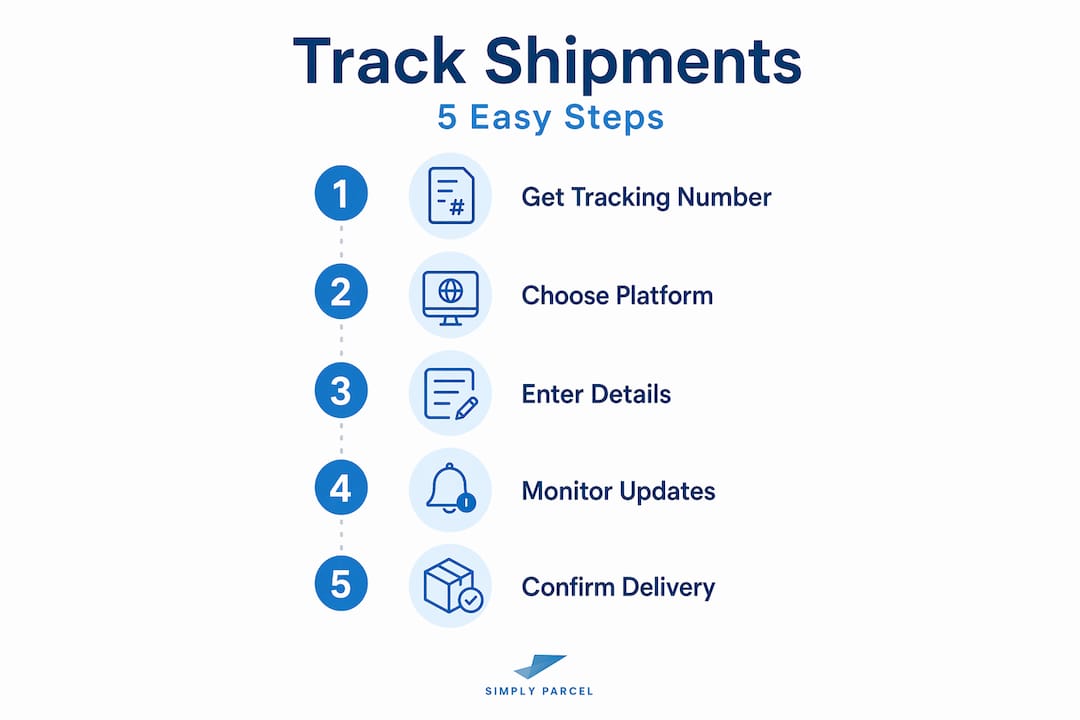
With the tools and basics ready, here is the step-by-step tracking process to stay updated on your international shipments.
-
Locate your tracking number. Check your shipment confirmation email, your courier's booking portal, or the physical shipping label. If you booked through an aggregator, the tracking number appears in your booking summary.
-
Choose your tracking platform. For single shipments, the carrier's official website gives the most detailed scan history. For multiple shipments or multi-courier setups, use AfterShip or 17TRACK.
-
Enter your tracking number. Paste it into the search field. If the platform auto-detects the carrier incorrectly, manually select the correct one from the dropdown.
-
Monitor these key milestones in order:
- Origin pickup or drop-off scan
- Export scan at Singapore departure facility
- In-transit scans at intermediate hubs
- Customs clearance at destination country
- Arrival at destination delivery facility
- Out for delivery and final delivery confirmation
-
Set up milestone alerts. Both AfterShip and 17TRACK allow email or push notifications for specific status changes. Configure alerts for "customs cleared" and "out for delivery" rather than every minor scan event.
-
Allow for scan gaps. International parcels move through 4+ tracking environments creating 24 to 72 hour lags between scans, particularly during transoceanic transit. This is normal. A gap in updates does not mean your parcel is lost.
-
Check the carrier site directly if needed. When a platform shows incomplete data, the carrier's own tracking page sometimes has more granular scan entries. Cross-referencing both sources takes under two minutes.
Comparing multi-carrier tracking platforms
| Feature | AfterShip | 17TRACK | Carrier website |
|---|---|---|---|
| Carrier coverage | 1,311+ | 2,500+ | 1 |
| Branded tracking page | Yes (paid) | No | No |
| Email/SMS alerts | Yes | Yes | Varies |
| API access | Yes | Yes | Varies |
| Cost | Free/Paid tiers | Free/Paid tiers | Free |
| Best suited for | SME e-commerce | Budget/economy | Single carrier |
Choosing the right best courier services Singapore also affects how much tracking detail you get from the start. Premium couriers like DHL Express and FedEx offer more frequent scans than economy postal services.
Pro Tip: Set milestone alerts instead of refreshing your tracking page manually. You will get the same information faster, with none of the frustration of staring at a status that says "In transit" for 36 hours.
Common challenges and how to troubleshoot them
Tracking is not always perfect. Here are the most common issues Singapore shippers encounter and what to do about each.
No updates after dispatch
Economy services often have long gaps between scans, especially once a parcel leaves Singapore. Wait 48 to 72 hours before taking action. If no update appears after that window, try tracking on both the multi-carrier platform and the carrier's own site. Sometimes one system updates faster than the other.
Tracking number not found
New tracking numbers can take 12 to 24 hours to activate in the carrier's system after booking. If you receive a tracking number immediately upon booking, wait until the following day before troubleshooting.
Limited destination country scans
This is the most common issue with Singapore Post's registered service. SingPost's registered service provides scan status only up to dispatch from Singapore, with limited destination updates. Enquiries take 1 to 3 weeks to resolve, and compensation for lost registered mail is capped. If you need full destination visibility, consider a courier with end-to-end tracking.
For lost or significantly delayed parcels, compensation under Singapore Post's registered service is limited. Always check the compensation policy of your chosen courier before shipping high-value items.
Carrier changes during transit
Some international routes involve carrier handoffs. For example, a parcel shipped via one courier may be handed to a local postal authority at the destination. In this case, you may receive a new tracking number for the final leg. Check your original tracking page for a note about carrier handoff, or contact your courier's support line to obtain the secondary tracking number.
When to file a formal claim
If your parcel exceeds the expected delivery window by more than five business days with no update, submit an enquiry through your courier's official portal. Include your tracking number, booking receipt, and proof of shipment value. Keep copies of everything.
Pro Tip: Always get a receipt at drop-off or confirm pickup electronically. This is your primary evidence if a claim becomes necessary. For tips on sending packages overseas Singapore, keeping documentation organized from the start saves significant time later.
How technology is improving tracking visibility for Singapore shippers
Beyond basics, new technology is changing how shipments are tracked and monitored across global supply chains.

From barcodes to RFID
Traditional tracking relies on barcode scans at fixed checkpoints. If a parcel passes through a facility without being scanned, that leg of the journey becomes invisible. RFID (Radio Frequency Identification) changes this. RFID tags emit signals that readers pick up without direct line of sight, enabling continuous location sensing even when parcels are moving through large sorting facilities.
UPS's RFID rollout will reduce misloads by nearly 70%, enabling always-on end-to-end visibility. For Singapore importers and businesses using UPS for inbound international freight, this means fewer unexplained scan gaps and more accurate delivery estimates.
Predictive ETAs and exception alerts
Modern tracking platforms now use historical data and machine learning to generate predictive estimated delivery times. Instead of telling you a parcel is "in transit," they tell you it is likely to arrive within a specific window, based on current location and typical carrier performance on that route. Exception alerts flag anomalies like customs holds or weather delays before they become serious problems.
Benefits for Singapore small businesses
- Fewer customer service inquiries about shipment status
- Earlier detection of delays, giving you time to communicate proactively
- More accurate delivery promises to set at the point of sale
- Reduced operational cost from lower claims and fewer reshipped orders
Branded tracking pages
For small businesses, a branded tracking page (available through platforms like AfterShip) replaces the carrier's generic tracking page with your own logo and messaging. This keeps customers engaged with your brand through delivery, rather than bouncing to a third-party site. It is a small detail with a meaningful impact on repeat purchase rates.
For a broader view of the international shipping guide Singapore context, technology adoption by your chosen courier directly affects how much tracking transparency you can offer your customers.
Verifying delivery and managing post-delivery tracking issues
After the tracking journey, verifying delivery and handling any exceptions that arise is just as important as the tracking process itself.
How to confirm delivery
- Check the tracking status. A "Delivered" scan with a timestamp confirms the parcel reached its destination. Some carriers also provide a delivery photo or signature capture.
- Contact the recipient directly. For high-value shipments, a quick message to confirm receipt is worth the effort, especially for business-to-business deliveries.
- Download proof of delivery. Most premium couriers allow you to download a formal proof of delivery (POD) document from their portal. Save this for your records.
Handling delivery exceptions
- Customs delay: Contact your recipient to confirm all duties are paid and required documents are submitted to local customs authorities.
- Incorrect address: Contact the carrier immediately. Most carriers allow address corrections before the final delivery attempt, though fees may apply.
- Failed delivery attempts: Check if the carrier left a pickup notice. Many carriers hold parcels at a local depot for 5 to 7 days before returning them.
Filing claims for lost parcels
Accurate tracking reduces reships and refunds by enabling disciplined handoffs and minimizing support tickets for Singapore small e-commerce businesses. If a parcel is confirmed lost, gather all documentation: booking confirmation, tracking history, commercial invoice, and proof of item value. File through the carrier's official claims portal within their stated window, which varies from 30 to 90 days depending on the carrier.
Managing customer communication
- Share tracking links with customers at the point of dispatch, not at the point of delivery.
- Use automated notifications for key milestones so customers get updates without contacting you.
- If a delay occurs, proactively message the customer with what you know and your next steps.
Pro Tip: Keep a simple tracking log for all outbound shipments, including the carrier, tracking number, expected delivery date, and customer contact. This log will speed up any dispute or claim resolution significantly. You will also need it when managing international shipping docs Singapore for compliance purposes.
Why the conventional wisdom on international shipment tracking is backwards for Singapore SMEs
Here is something most tracking guides will not tell you: obsessively refreshing your tracking page does not make your parcel move faster, and it does not give you better information. It gives you the same information you had 20 minutes ago, plus frustration.
The conventional advice is to "check tracking regularly." But regular checking only helps if there is something actionable to find. International economy tracking often jumps locations due to multi-carrier handoffs without intermediate scans. What looks like a tracking gap is almost always a normal part of the shipment journey. Insiders recommend setting alerts for export departure, transit arrival, customs clearance, and final delivery instead of constant refreshes.
The real problem for Singapore SMEs is not a lack of tracking data. It is an over-reliance on individual carrier portals, which only show one carrier's leg of a multi-carrier journey. A parcel booked through a courier aggregator may pass through two or three carrier systems before reaching its destination. Checking only the original carrier's site leaves you blind to the final leg.
The smarter move is to use a consolidated dashboard from day one, set milestone alerts, and then focus your energy on exception management rather than passive monitoring. When an alert fires for "customs hold" or "failed delivery attempt," that is when you act. That is when your response time actually affects the outcome.
For Singapore small businesses managing WISMO (Where Is My Order) queries, the real win comes from giving customers tracking links immediately at dispatch. When customers can self-serve their tracking information, support ticket volume drops sharply. Pair that with affordable international shipping options that include built-in tracking, and you have a system that works without constant manual intervention.
The goal is not to watch your shipments. It is to be notified when something needs your attention.
Simplify your international shipment tracking with Simply Parcel
Now that you know how to track shipments confidently, here is how Simply Parcel can make the entire shipping and tracking process easier and more reliable for you.
Simply Parcel is a Singapore-based shipping platform that connects you with leading international couriers, including priority, connect-plus, and economy options, so you can choose the service that fits your timeline and budget. When you book through Simply Parcel, you get automatic label generation, integrated tracking across couriers, and timely notifications, all from one platform. You can get a shipment quote in minutes and book pickup without leaving your desk. The parcel tracking feature consolidates your shipment status across carriers, reducing the need to check multiple sites. Whether you are sending one parcel or managing regular outbound orders, Simply Parcel gives you the visibility and control to keep customers informed and deliveries on track.
Frequently asked questions
What should I do if my international shipment's tracking number shows no updates for several days?
First, confirm whether you are using an economy service, as 24-72 hour scan gaps are normal on multi-carrier international routes. If no updates appear beyond the expected delivery window, contact the carrier directly or submit an enquiry form with your booking receipt and proof of shipment.
How can small businesses in Singapore reduce customer inquiries about shipment status?
Use a multi-carrier tracking platform with branded tracking pages and automated notifications. Small businesses integrating AfterShip reduce WISMO (Where Is My Order) queries by up to 63% through branded pages and automatic status updates sent directly to customers.
Does Singapore Post's registered mail offer full international tracking?
No. SingPost's registered service only provides scan status up to dispatch from Singapore, with limited or no destination country updates. Enquiries take 1 to 3 weeks, and compensation for lost parcels is limited, so it is not ideal for high-value or time-sensitive shipments.
What new technologies are improving international shipment tracking visibility?
RFID technology is the most significant current advancement. UPS's RFID rollout reduces misloads by nearly 70% and enables continuous, real-time parcel location updates across its global network, improving tracking accuracy for Singapore importers and exporters using the service.