
A missed pickup courier occurs when a scheduled carrier fails to collect your parcel during the booked pickup window — and your tracking never updates to "Picked Up." Your first move is to check tracking, document the situation, and contact your carrier. According to Easyship's support guidance, a missed pickup is specifically when a courier fails to show up for a successfully scheduled pickup request — not a failed delivery or a booking you cancelled yourself.
Here's what to do in the first 30 minutes:
- Check tracking in your carrier portal or app and confirm no "Pickup Attempted" or "Picked Up" scan exists.
- Take timestamped photos of your packaged parcel, the label, and your staging area.
- Note who was present at the pickup location and the exact time the window closed.
- Save your order number, booking confirmation, and pickup address in one place.
- Open a support ticket or call your carrier right away — delays reduce your options.
- Log the time you discovered the miss and every action you take afterward.
Key Takeaways
A missed pickup courier event is resolved fastest when you document the miss immediately, contact your carrier within the same business day, and reschedule through the self-serve portal before escalating to support.
| Point | Details |
|---|---|
| Document immediately | Take timestamped photos and screenshot tracking history the moment the window closes. |
| Use self-serve portals first | Tools like USPS Modify Order let you reschedule date, location, and package details without a phone queue. |
| Book wide windows early | Book at least one business day ahead with the widest ready/close window to avoid carrier cutoff misses. |
| Claims need full documentation | Gather booking confirmation, photos, proof of value, and tracking history before filing any refund or claim. |
| Simplyparcel reduces pickup risk | Simplyparcel's booking flow, automatic label generation, and real-time tracking help prevent the most common causes of a missed pickup. |
Table of Contents
- What actually counts as a missed pickup courier event?
- Why couriers miss pickups: operational and shipper-side causes
- Step-by-step actions to take right after a missed pickup
- How to reschedule a pickup and file a refund or claim
- Practical steps to avoid missed pickups next time
- Pickup windows explained, and when to escalate
- Why accurate pickup data matters more than most shippers realize
- Simplyparcel makes your next pickup easier to get right
- Sources
What actually counts as a missed pickup courier event?
A missed pickup is a scheduled collection that was not completed during the booked window and shows no confirmed "Picked Up" status in tracking. That definition matters because it determines whether you have grounds for a reschedule, a refund, or a claim.
What qualifies:
- The pickup window closed with no driver arrival and no tracking scan.
- A driver arrived but could not access the location and left without attempting contact.
- Tracking shows "Pickup Attempted" but no one at the address was notified or present.
What does not qualify:
- A failed first delivery attempt (the carrier tried to deliver to the recipient, not collect from you).
- A booking you cancelled or modified before the window opened.
- A pickup deferred by the carrier with advance notice and a new confirmed date.
Business scenario: A small e-commerce seller books a pickup for 9 AM–5 PM on a Tuesday. The driver never arrives and tracking shows no scan. That is a missed pickup.
Residential scenario: A homeowner books a USPS pickup for a Monday. USPS tracking shows "Pickup Attempted" at 2:15 PM, but no one was home and no notice was left. That is a missed pickup attempt — and the shipper needs to reschedule.
Evidence checklist to prove a missed pickup:
- Tracking history screenshot with no "Picked Up" scan during the window.
- Timestamped photos of the packaged parcel at the pickup location.
- Booking confirmation showing the scheduled date and window.
- Name of any witness present at the location during the window.
Why couriers miss pickups: operational and shipper-side causes
Understanding the root cause helps you fix the problem before rescheduling — and prevents the same miss from happening twice. Common reasons include incorrect address details, no one available to hand over the parcel, and access issues at the pickup location.
- Booking after the carrier cutoff. Most carriers set a same-day or next-day booking cutoff. Miss it and your pickup rolls to the next available route slot.
- Narrow ready/close window. A one-hour window gives the driver almost no flexibility. If traffic or a prior stop runs long, your stop gets skipped.
- Route capacity overload. Drivers carry a fixed number of stops per route. High-volume days push lower-priority stops to the next day.
- Missing accessorial information. Freight requiring a liftgate, inside pickup, or appointment access that wasn't declared at booking often gets bypassed entirely.
- Driver routing conflicts. GPS or dispatch errors occasionally route drivers to the wrong address or sequence.
- Parcel not staged or ready. If the package isn't at the door or dock when the driver arrives, many carriers will not wait.
- Incorrect or incomplete address. A missing suite number, wrong zip code, or ambiguous building name sends the driver to the wrong location.
- No one available to sign. Some shipments require a signature at collection. If no authorized person is present, the driver leaves.
- Security or access restrictions. Gated communities, locked loading docks, or building security that won't allow entry all stop a pickup cold.
- Label or documentation missing. A driver who arrives and finds no label or no bill of lading cannot legally take the freight.
Pro Tip: Book with the widest ready/close window your schedule allows — ideally 8 AM to 5 PM — and stage your freight with printed labels and documents at least 30 minutes before the window opens. This single habit eliminates causes 1, 2, 6, and 10 simultaneously.
Step-by-step actions to take right after a missed pickup
Speed matters here. The faster you act, the more likely you are to get same-day or next-day reservice without extra fees.
-
Confirm tracking status. Log into your carrier portal and verify there is no "Picked Up" or "Pickup Attempted" scan. Screenshot the tracking history with the timestamp visible.
-
Capture evidence. Photograph the packaged parcel, the shipping label, and the staging area. Note the exact time the pickup window closed.
-
Check your booking confirmation. Verify the pickup address, ready/close window, and any special instructions you entered. Errors here are your responsibility to correct before rescheduling.
-
Verify access and instructions. Confirm the pickup location is accessible, the correct contact number is on file, and any building or gate codes are accurate.
-
Attempt reschedule via the carrier portal or app first. Self-serve tools are faster than phone queues. USPS, for example, lets you modify pickup date, location, and package details directly through its online Modify Order interface.
-
Open a support ticket or call if the portal doesn't resolve it. Use this contact template:
-
Escalate if needed. If the carrier's first-line support cannot confirm a reschedule within 24 hours, ask for a supervisor review. Request a written confirmation of the new pickup date.
Carrier support channels to know:
- Online portal or app: Fastest for simple reschedules; available 24/7.
- Live chat: Good for same-day issues when the portal is unclear.
- Phone: Best for complex freight, accessorial disputes, or escalations.
- Email/ticket: Creates a paper trail — always use this in parallel with phone calls.
After you contact support, expect a confirmation email or ticket number. Keep it. You'll need it if the pickup misses again or if you file a claim.
How to reschedule a pickup and file a refund or claim
Rescheduling through the carrier portal
Most major carriers offer self-serve reschedule flows. For USPS, the Modify Order tool lets you change the pickup date, location, package count, and weight before the new scheduled window. For freight carriers, log into your account, locate the original shipment, and select "Reschedule Pickup." Enter a new ready/close window and re-confirm any accessorials.
Key things to re-enter accurately:
- Updated ready time and close time (use a wide window).
- Correct pickup address with suite or dock number.
- Any special instructions (liftgate, inside pickup, appointment required).
- Contact name and mobile number at the pickup location.
Documentation checklist for claims
If the missed pickup caused a financial loss — a late shipment fee, spoiled goods, or a missed customer deadline — you may be eligible for a refund or a declared-value claim. Gather:
- Timestamped tracking history screenshot.
- Original booking confirmation with scheduled window.
- Timestamped photos of the parcel at the pickup location.
- Proof of value: invoice, receipt, or purchase order.
- Witness name and contact information (if applicable).
- Any correspondence with the carrier about the miss.
When refunds vs. claims apply
A service refund applies when the carrier failed to perform a paid service (e.g., a guaranteed pickup fee). A declared-value or insurance claim applies when the missed pickup caused loss or damage to goods. Standard pickup services are rarely guaranteed, so refunds for non-guaranteed misses are at the carrier's discretion.
Typical carrier response timelines
| Stage | Typical timeframe | Notes |
|---|---|---|
| Reschedule confirmation | Same day to 24 hours | Faster via self-serve portal |
| Claim acknowledgement | 3–10 business days | Varies by carrier and service level |
| Claim resolution | 30 days | Depends on declared value and documentation |
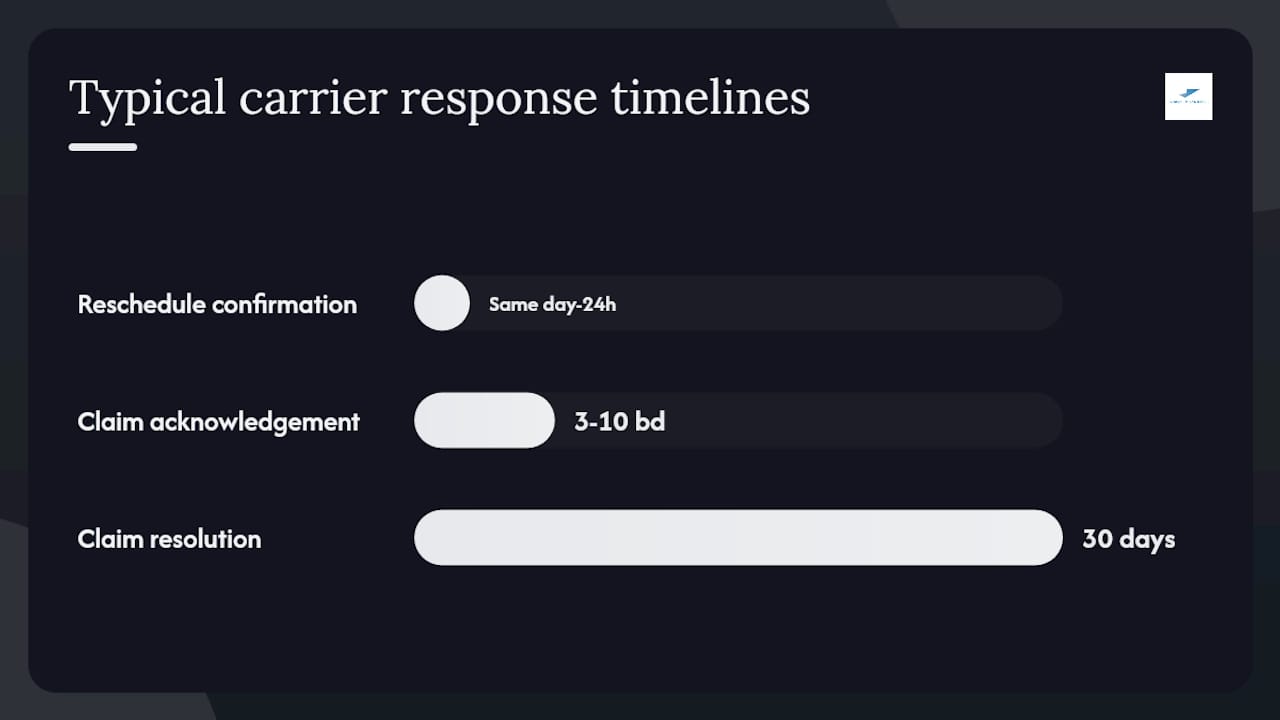
Actual times vary by carrier, service level, and claim complexity.
Practical steps to avoid missed pickups next time
Prevention is simpler than resolution. Most missed package collections trace back to a handful of fixable habits.
Packing and staging rules:
- Print labels and any required documents (bill of lading, customs forms) before the pickup window opens.
- Stage the parcel at the exact pickup point — door, dock, or reception desk — at least 30 minutes early.
- Attach the label securely and make it visible from a distance.
Booking best practices:
- Book at least one full business day ahead to avoid carrier cutoff issues, as Ltl when noting that booking after cutoff is one of the most common causes of a missed pickup.
- Use the widest ready/close window your schedule allows.
- Declare all accessorials (liftgate, inside pickup, appointment) at the time of booking, not after.
- Double-check the address, including suite or unit number and any gate or access codes.
Operational backups:
- Identify a nearby drop-off location (carrier retail counter or authorized drop point) as a backup if the pickup misses again.
- Use multi-carrier shipping so you're not dependent on a single carrier's routing capacity.
- Set calendar reminders for the pickup window and assign a specific person to be present.
Pro Tip: For business shippers sending multiple parcels per week, integrate parcel tracking into your order management system. Automated alerts for "no pickup scan by X time" let you catch a miss within minutes rather than hours — and same-day reschedules are far easier to secure than next-day ones.
Pickup windows explained, and when to escalate
How pickup windows work
A pickup time window is the scheduled period during which a carrier is expected to arrive at your location. Carriers use windows rather than fixed clock times because they route drivers across multiple stops in sequence — a guaranteed single time would require holding a driver at your location regardless of traffic or prior stops.
LTL.Delivery notes that a pickup date in LTL freight is typically a requested day, not a guaranteed clock time. The carrier schedules a driver within a routing window, and narrow shipper windows or late bookings are among the most frequent causes of a missed pickup.
For long-distance freight and moving services, pickup windows often cover several days to provide scheduling flexibility. Muscleman Elite's moving glossary describes multi-day pickup windows as standard for long-haul moves, with point-of-load (a specific, guaranteed date) available for a premium fee. Law Insider's pick-up window definitions show that contractual windows range from a 30-minute slot to a full business day, depending on the carrier and service type.
Pickup window types and shipper commitments
| Window type | Typical span | Shipper commitment | Premium cost |
|---|---|---|---|
| Single-day request | Full business day | Parcel ready all day | None (standard) |
| LTL routing window | 1–3 business days | Freight staged, dock available | None (standard) |
| Point-of-load / guaranteed | Specific date and time | Parcel ready at exact time | Yes — carrier-dependent |
When to escalate
- After 24 hours with no reschedule confirmation: Ask for a supervisor and request written confirmation of the new date.
- After a second missed pickup: Request a guaranteed or point-of-load pickup option and ask whether a premium fee applies.
- If a guaranteed pickup fee was charged and the pickup was missed: Request a full refund of that fee in writing.
- If the carrier is unresponsive after 48 hours: File a complaint with the carrier's formal dispute resolution team. For international shipments, consult your freight forwarder or platform provider for escalation paths.
Why accurate pickup data matters more than most shippers realize
At Simplyparcel, we see a consistent pattern across the shippers who use our platform: the missed pickups that cause the most disruption are rarely the carrier's fault alone. They almost always involve a combination of a narrow ready window, an address field with a missing detail, and no one assigned to be present during the window.
Our platform's online booking flow prompts you to enter a wide ready/close window, confirm the exact pickup address with unit details, and add special access instructions before the booking is confirmed. Automatic label generation means your documentation is ready before the driver arrives — not scrambled together at the last minute. And our real-time tracking lets you monitor pickup status so you can act within minutes if a scan doesn't appear.
If you're dealing with a missed pickup right now or want to reduce the risk on your next shipment, schedule your pickup through Simplyparcel and get a quote in minutes.
Simplyparcel makes your next pickup easier to get right
Missed pickups cost time, money, and customer trust. Simplyparcel gives you a faster path back on track: compare rates across multiple courier partners, book a pickup with a wide ready window, and get your shipping label generated automatically before the driver arrives. No scrambling for documents at the last minute, no single-carrier dependency when routes fill up.
Whether you're an individual sending a parcel abroad or a small business managing weekly shipments from Singapore, Simplyparcel's platform is built to reduce the friction that leads to failed pickup requests. Real-time tracking keeps you informed from the moment a pickup is scheduled, so you catch any issue within minutes rather than hours.
Get an instant quote and book your pickup at Simplyparcel today.
Sources
Use these resources to check carrier-specific pickup windows, reschedule portals, and claims procedures directly.
- Ltl
- Pick-up Time Window Definition & Meaning
- Modify or Cancel Pickups — USPS tools
- What is a Missed Pickup and What You Should Do
- Missed a Courier Collection? Here's What to Do Next
- Pickup Window — Moving Glossary | Muscleman Elite
Always check your carrier's own support page and your original booking confirmation for exact cutoff times, required documentation, and claims submission deadlines — these vary by carrier, service level, and shipment type.